

The CMS used by more than 42% of websites is now deploying its new version: WordPress 5.8, nicknamed “Tatum” in homage to jazz pianist Art Tatum. This is the second update of 2021, following the launch of WordPress 5.7 last March. A hundred improvements and new features are on the program, including a series of major changes.
Introducing Full Site Editing, the new site management experience
The release of WordPress 5.8 is an opportunity for the CMS to introduce the second phase of the Gutenberg project, the Full site edition (FSE), which aims to offer a new native site management experience, based on a system of customizable editorial blocks.
WordPress 5.8 is a somewhat special version, because it contains the first bricks of the complete site edition, a feature known in English as “FSE” for “Full Site Editing” (….), whose arrival in WordPress will be split between WP versions 5.8 and 5.9, explains Core team representative Jean-Baptiste Audras in a blog post.
Concretely, you will be able to benefit from the following functionalities related to FSE:
- a theme.json file for themes supporting full site editing, which allows you to declare the features supported by the theme,
- a new template directory, which provides the ability to create, assign and edit block templates to specific posts and pages,
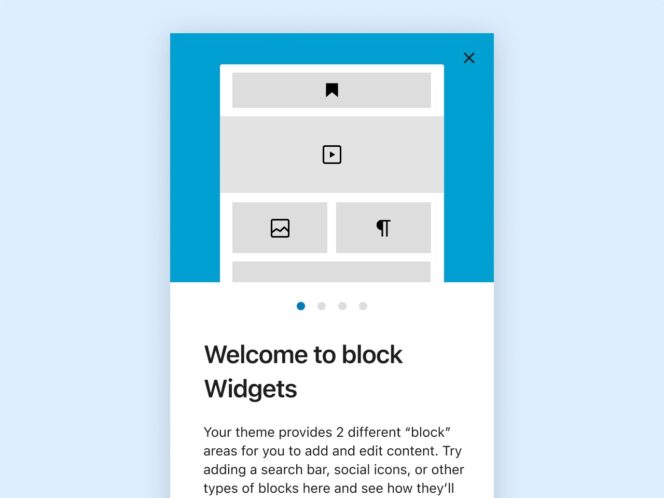
- a new widget editor to add blocks in the dedicated area to customize the pages of your site,
- access to the block editor from the widgets screen, in addition to the edit posts screen (and soon from the menus screen with WordPress 5.9),
- improvements relating to the loading of CSS styles associated with blocks, which provide performance gains and better control over style sheets.
Note that if you don’t want to use the new built-in widget editor in WordPress 5.8, you can install the Classic Widgets extension to keep the old version.
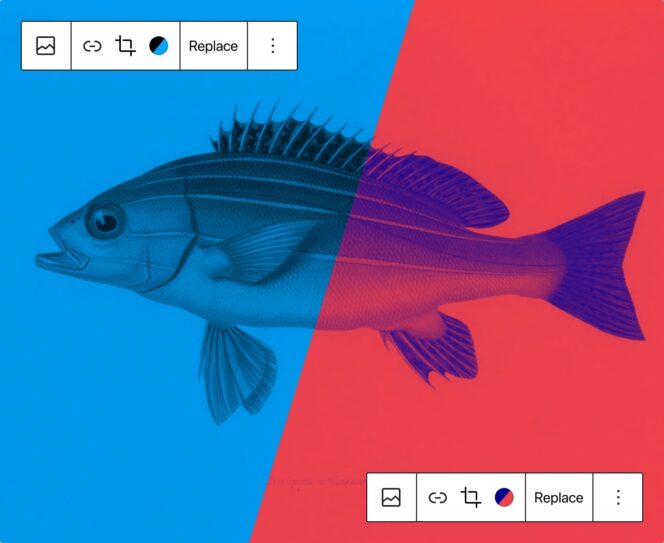
A new block duotone allows you to add ” a splash of color to your designs and stylize your images (or videos in the cover block) to fit well with your themes ». WordPress specifies that it is also possible to use this two-color effect as a black and white filter.
WebP format support for media files
WordPress 5.8 supports the WebP image format, which features better file compression. The resulting images are on average about 30% smaller than those saved in JPEG or PNG format. The objective: to use less bandwidth when loading WebP images and thus speed up the display of the site to offer a better experience to the users of your site.
This support for the WebP format is complete, and all the filters and hooks available on the rest of the media files are also available for your media in the WebP format, which is a much more capable format than the “antiques”. » PNG or JPEG formats, adds Jean-Baptiste Audras.
Other new features offered by WordPress 5.8
Among the features integrated as part of the release of the latest version of the CMS, we also find:
- the ability to select multiple menu items and delete them with one click (a ticket that was over 9 years old),
- a new “Update URI” header field that you can use in the main file of your extensions to define the source during an update,
- improved improvements to the Site Health screen,
- new block compositions for native themes, waiting for the next theme twenty twenty two planned during the launch of WordPress 5.9 planned for the end of the year,
- End of support for Internet Explorer 11.
Indeed, this end-of-life browser has represented less than 1% of the browser market share since the beginning of 2021. Discontinuing support for this old browser will greatly improve admin display performance across all other browsers, by stripping WordPress of the CSS rules and JavaScript polyfills needed to support WordPress. ‘IE 11. These changes only concern the administration interface. The themes will be free to support or not the old IE 11, confirmed representative of the Core team of WordPress.
How to download WordPress 5.8 update?
The latest version of the CMS has been available for download since July 20, 2021 on the official WordPress site. It is also possible to launch the WordPress 5.8 update directly from the administration interface of your site: Dashboard > Updates. Before downloading, it is highly recommended to back up your database and site files.
